Home / Blogs / Stay Audit Ready With Pharmaceutical Compliance Management Software
Stay Audit Ready With Pharmaceutical Compliance Management Software
Stay audit ready with compliance management software that connects training, SOPs, CAPA, and evidence to identify gaps before inspections.
compliance
Posted on Aug 28, 2026
Connect training, SOPs, CAPA, and compliance evidence with pharmaceutical compliance management software built for continuous regulatory readiness.
Executive Summary
Compliance management software gives finance teams the traceability manual, paper-based reviews can't provide.
What Does It Mean to Be Audit Ready?
Audit readiness means having the required training, SOPs, quality records, and compliance evidence accurate, current, and available when an inspector requests them. Pharmaceutical compliance management software helps maintain this readiness by automating compliance tracking, identifying gaps, and simplifying access to required records.
Audit readiness can fail long before an inspector arrives.
For compliance, quality, training, HR, and L&D leaders in pharmaceutical organizations, this guide explains how pharmaceutical compliance management software can support continuous audit readiness instead of relying on last-minute inspection preparation.
You’ll learn how to:
Apply the SyberWorks TRACE Framework™
Trigger training from SOP and compliance changes
Control SOPs, approvals, and acknowledgments
Connect CAPA with corrective training
Capture and retrieve inspection evidence
Evaluate readiness and identify compliance gaps
The guide also covers real-world examples, best practices, common mistakes, and a TRACE-based audit-readiness checklist.
Assess your audit readiness with pharmaceutical compliance management software and identify compliance gaps before an inspection.
Why Audit Readiness Matters in Pharmaceutical Companies
Audit readiness goes beyond inspection preparation. Pharmaceutical compliance management software helps teams maintain accurate records, controlled processes, and accessible evidence while supporting regulatory compliance, data integrity, and operational continuity.
Protects Product Quality and Patient Safety
Audit readiness helps ensure employees follow current procedures and that quality issues are properly documented, investigated, and addressed. FDA'sData Integrity and Compliance With Drug CGMP: Questions and Answers explains why reliable and accurate data is essential to CGMP compliance.
Pharmaceutical compliance management software can help organizations maintain the training, SOP, and quality records needed to demonstrate that regulated processes are being followed.
Keeps employees aligned with current approved procedures
Supports documented corrective and preventive actions
Maintains evidence needed to support quality decisions
Strengthens Regulatory Compliance and Inspection Readiness
FDA expects data to be reliable and accurate throughout its lifecycle, including creation, modification, maintenance, retrieval, and archival. FDA also defines an audit trailas a secure, time-stamped electronic record that reconstructs changes to an electronic record.
Pharmaceutical regulatory compliance software can support these requirements by helping teams control SOP versions, approvals, training records, electronic records, and audit histories within structured compliance processes.
Controls document versions and approval workflows
Maintains traceable training and compliance records
Supports audit-trail and electronic-record requirements where applicable
Makes required evidence easier to retrieve during inspections
The importance of this control remains current. In a March 2026 warning letter, FDA cited Tentamus India for incomplete data and records that compromised the reliability of information used to support drug quality.
Lab technician performing quality testing tracked through compliance management software
Reduces Administrative and Corrective-Action Burden
Manual compliance management can leave teams spending time identifying affected employees, tracking overdue training, reconciling records, and verifying whether corrective actions are actually complete. These gaps can make quality investigations and CAPA closure more difficult.
Pharmaceutical compliance management software can automate routine compliance activities and connect required training with corrective actions, reducing the administrative effort involved in managing them separately.
Automates training assignments and completion tracking
Connects CAPA actions with required corrective training
Identifies overdue or incomplete compliance activities
Provides visibility into outstanding compliance requirements
Protects Revenue, Customer Confidence, and Operational Continuity
Compliance problems can extend beyond an FDA inspection. Missing records or unresolved quality issues can delay responses to customers, partners, and auditors and create operational disruption while teams reconstruct evidence.
Pharmaceutical regulatory compliance software can help organizations retrieve relevant compliance documentation more efficiently and maintain the evidence needed to respond to regulatory and customer requests.
Speeds access to compliance documentation
Supports regulatory, customer, and partner audit requests
Reduces disruption caused by manual evidence collection
Helps teams address compliance gaps before they affect operations
Audit readiness is an ongoing discipline, not a last-minute exercise. Pharmaceutical compliance management software helps teams use the SyberWorks TRACE Framework™ to continuously manage training, SOPs, CAPA, evidence, and readiness.
The SyberWorks TRACE Framework™: A 5-Step Approach to Continuous Audit Readiness
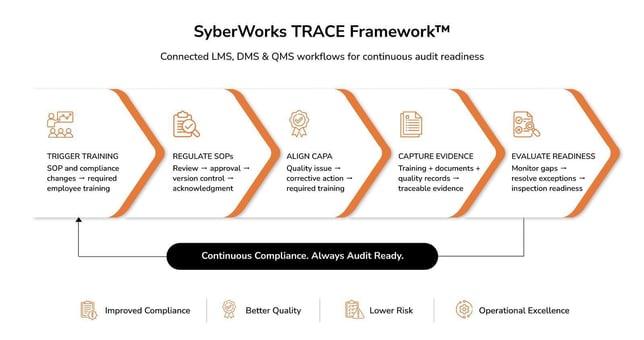
A connected compliance management software workflow — from training triggers to continuous audit readiness.
How do pharmaceutical companies stay audit ready?
Pharmaceutical companies stay audit ready by continuously monitoring compliance, keeping required records current, and addressing gaps before an inspection. Pharmaceutical compliance management software helps teams track these requirements and maintain the evidence needed to demonstrate compliance.
The SyberWorks TRACE Framework™ organizes this process into five stages:
Trigger Training: Assign training when requirements, SOPs, roles, or quality needs change.
Regulate SOPs: Control document review, approval, versioning, acknowledgment, and distribution.
Align CAPA: Connect corrective actions with the training needed to address quality findings.
Capture Evidence: Maintain traceable records of training, approvals, changes, and quality activities.
Evaluate Readiness: Monitor exceptions and verify that required evidence can be retrieved when needed.
Pharmaceutical compliance management software can support each stage through configurable workflows, reporting, and connected compliance processes.
The rest of this guide uses TRACE to show how pharmaceutical teams can identify gaps, strengthen controls, and maintain audit readiness continuously.
Step 1: Trigger Training
Trigger Training means assigning required employee training when an SOP, regulatory requirement, competency, role, department, or quality-system recommendation changes. SyberWorks’ pharmaceutical compliance management software helps automate these assignments so training requirements stay aligned with operational and compliance changes.
Define Training Rules: Map required courses to employee roles, departments, competencies, SOPs, and applicable compliance requirements so the right training is assigned to the right employees.
Automate Training Triggers: Configure workflows to initiate training when relevant SOPs or compliance requirements change, reducing the need for managers or training teams to identify employees manually.
Track Completion Status: Monitor completion and delinquent training through automated tracking and reminders, giving compliance and training leaders visibility into outstanding requirements before they become readiness gaps.
Connect QMS Recommendations: Link QMS recommendations and corrective actions to required training so quality findings can generate appropriate learning requirements without relying on separate manual requests.
Pro Tip: Build training rules around roles, departments, competencies, SOPs, and QMS recommendations rather than assigning courses broadly. This keeps training relevant while reducing unnecessary assignments.
“Effective Trigger Training turns changes in procedures, responsibilities, and quality requirements into defined training actions without relying on manual identification and follow-up.”
Step 2: Regulate SOPs
Rows of paper files highlight why finance leaders are turning to compliance management software for control and traceability.
Regulating SOPs means controlling how procedures are reviewed, approved, versioned, acknowledged, and distributed. SyberWorks’ pharmaceutical compliance management software supports configurable document workflows that help pharmaceutical teams manage SOP changes consistently and ensure employees receive the current approved version.
How to Implement SOP Control
Customize Review Workflows: Configure document workflows around your organization's review requirements, approval roles, and compliance processes rather than relying on generic email-based document routing.
Control SOP Versions: Use automated version control to maintain the current approved SOP and prevent outdated versions from remaining in circulation across teams or locations.
Capture Approvals Electronically: Record document approvals and acknowledgments electronically, creating a traceable history of who reviewed, approved, or acknowledged each compliance-critical document.
Manage SOP Distribution: Distribute approved documents through controlled workflows, so employees receive the appropriate version and required acknowledgments can be tracked systematically.
Pro Tip: Define approval paths by document type, department, role, and compliance requirement so critical SOPs follow the right review process without creating unnecessary approval delays.
“Effective SOP control creates a consistent path from document revision through review, approval, version control, acknowledgment, and distribution.”
Step 3: Align CAPA
Align CAPA means connecting quality findings and corrective actions with the employee training needed to address them. SyberWorks’ pharmaceutical compliance management software connects QMS recommendations with LMS training requirements, so corrective actions can move from identification to completion without falling through manual handoffs.
How to Implement CAPA Alignment
Connect QMS Recommendations: Link QMS recommendations to relevant LMS training requirements so identified quality issues can automatically initiate the learning needed to address them.
Assign Corrective Training: Configure corrective actions to trigger required employee training based on the issue, affected roles, or applicable competencies, reducing separate manual training requests.
Track Training Completion: Monitor corrective training alongside CAPA progress so quality teams can verify that required learning is completed before corrective actions are considered fully addressed.
Verify CAPA Resolution: Review training completion and corrective-action status together to confirm that the response has addressed the identified issue and supports preventing recurrence.
Pro Tip: When a CAPA requires employee retraining, connect the QMS recommendation directly to the LMS requirement so training becomes part of the corrective-action workflow rather than a separate task.
“Aligning CAPA with LMS training helps ensure quality findings generate the corrective learning required to address them and prevents training requirements from falling through the cracks.”
Step 4: Capture Evidence
Cross-checking paper reports against digital records shows the gap compliance management software is built to close.
Capture Evidence means maintaining a reliable record of who performed an action, what changed, when it changed, and how it was approved. Pharmaceutical compliance management software helps teams maintain training, document, and quality records so compliance evidence can be retrieved when needed.
How to Implement Evidence Capture
Record User Activity: Maintain electronic records showing who completed training, changed a document, performed an action, or approved a compliance activity, creating a clear activity history.
Preserve Document History: Track document versions and changes so teams can establish what was modified, when it changed, and which version was approved for use.
Maintain Approval History: Capture electronic approvals and acknowledgments to establish who reviewed or approved compliance-critical documents and when those actions occurred.
Track Training Completion: Maintain training completion records alongside applicable compliance requirements so teams can demonstrate who completed required training and when it was completed.
Retain Quality Records: Maintain relevant quality records, including corrective-action activity and QMS information, so evidence supporting compliance decisions remains available for review.
Pro Tip: Build evidence requirements into the workflow itself. If an action, approval, training event, or document change requires proof, configure the process to capture that evidence when the activity occurs.
“Effective evidence capture using pharmaceutical compliance management software creates a traceable history of who acted, what changed, when it changed, and how it was approved, making compliance evidence easier to demonstrate during inspections.”
Step 5: Evaluate Readiness
Evaluate Readiness means regularly checking whether required training, SOPs, CAPAs, acknowledgments, records, and inspection evidence are complete and retrievable. SyberWorks’ pharmaceutical compliance management software provides compliance visibility and reporting to help teams identify exceptions before they become inspection-readiness gaps.
How to Implement Readiness Evaluation
Monitor Overdue Training: Review delinquent training and incomplete assignments by employee, role, or department to identify requirements that remain outstanding before an inspection.
Track Open CAPAs: Monitor unresolved corrective actions and associated training requirements to identify quality issues that remain incomplete or lack documented follow-through.
Review Document Status: Check for outdated SOPs, pending approvals, missing acknowledgments, or uncontrolled versions that could create gaps in document compliance.
Verify Record Completeness: Check training, document, approval, and quality records for missing information or incomplete histories that could weaken inspection evidence.
Test Evidence Retrieval: Periodically verify that required training, document, and quality evidence can be retrieved efficiently when requested by auditors or internal stakeholders.
Pro Tip: Turn readiness into a recurring review rather than a pre-inspection exercise. Prioritize overdue training, open CAPAs, outdated SOPs, missing acknowledgments, incomplete records, and retrieval gaps based on their compliance impact.
“Effective readiness evaluation turns audit preparation into an ongoing control process by identifying specific compliance exceptions while there is still time to resolve them.”
Together, the five stages of the SyberWorks TRACE Framework™ turn audit readiness into a continuous process; triggering required training, controlling SOPs, aligning CAPA, capturing compliance evidence, and evaluating gaps before an inspection.
The next section examines real-world SyberWorks examples to show how these capabilities have been applied to address practical compliance and operational challenges.
Real-World Examples: How Organizations Improved Compliance Readiness with SyberWorks
Real-world examples show how pharmaceutical compliance management software can address practical compliance, training, and quality challenges.
Healthcare employee completing role-based compliance training on a laptop as part of a compliance management software system
Joinn Biologics: Moving From Paper-Based Quality Processes to Connected Workflows
Joinn Biologics replaced paper-based quality processes with connected electronic workflows using SyberWorks. The organization connected quality events, corrective actions, change controls, controlled-document updates, and employee training into a more traceable process.
What changed:
Connected quality workflows: A Deviation Report could lead to a CAPA, which could initiate a Change Control Request (CCR) and related controlled-document updates.
Linked corrective training: When controlled documents changed, the updated requirements could trigger a new Read and Sign course for employees based on their job roles.
Faster processing: Each quality event saved an average of 20 minutes of combined employee and approver time;15 minutes for the initiator and 5 minutes for the approver.
Better quality visibility: Centralized quality data made it easier to search and trend events by type, date, root cause, and other factors.
Improved training control: The LMS provided visibility into training requirements and helped ensure employees trained on current procedure versions, while minimizing training-related deviations and non-conformances.
More customizable workflows: Joinn specifically valued SyberWorks for being user-friendly and easily customizable to different requirements.
Why this matters for TRACE: Joinn's workflow illustrates how a quality event can move through CAPA, document control, and corrective training as a connected process rather than a series of disconnected manual handoffs.
Liberty Dialysis: Standardizing Compliance Training Across 85+ Clinics
Liberty Dialysis needed a way to provide and track required employee education across 85+ clinics and more than 1,000 employees spanning the United States, Hawaii, and Alaska.
With regulatory training requirements from agencies including CMS, CDC, and OSHA, the organization implemented the SyberWorks LMS to standardize training, automate assignments, and monitor compliance across its clinic network.
What changed:
Standardized training: Liberty established consistent training requirements across clinics so employees in the same roles received the same core education and competency materials.
Job-based assignments: New-hire training and competency courses could be assigned based on employee job codes, helping ensure the appropriate staff received the required training.
Automated compliance training: Mandatory compliance courses could be assigned automatically on recurring schedules, including annual requirements.
Organization-wide visibility: LMS reporting allowed managers to monitor training progress and compliance both individually and across groups.
Scalable administration: The LMS supported Liberty's organizational hierarchy across regions, clinics, and departments as the organization continued to grow.
Survey-ready records: Training transcripts could be maintained as part of employee files, helping keep records current and available for surveys and compliance reviews.
Customized implementation: Liberty worked with SyberWorks to customize LMS features and workflows around its specific organizational and training requirements.
Why this matters for TRACE: Liberty's experience demonstrates how standardized, role-based training and recurring compliance monitoring can help organizations maintain visibility into training requirements across a large, distributed workforce rather than relying on individual clinics to manage compliance separately.
These examples show how connected compliance workflows can reduce manual work while improving visibility and traceability. Pharmaceutical compliance management software brings training, document, and quality processes together to support continuous audit readiness.
Next, we'll look at practical best practices for maintaining audit readiness.
7 Best Practices for Applying the TRACE Framework
The SyberWorks TRACE Framework™ helps teams maintain audit readiness across training, SOPs, CAPA, evidence, and readiness evaluation.
Bringing reports and dashboards into one shared view is what compliance management software is designed to do.
1. Trigger Training
Pro Tip 1: Link SOP Changes to Training
Identify affected employees and required training whenever an SOP or compliance requirement changes.
SyberWorks: Custom workflows can trigger role-based training when applicable SOPs change.
2. Regulate SOPs
Pro Tip 2: Create One Source of Truth
Keep current SOPs, training records, approvals, and quality records in a controlled environment.
SyberWorks: Connects LMS, DMS, and QMS workflows to support centralized compliance management.
Pro Tip 3: Standardize SOP Approvals
Define approval paths by document type, department, risk, and regulatory requirements.
SyberWorks: Configurable workflows support customized review, approval, acknowledgment, and distribution.
3. Align CAPA
Pro Tip 4: Connect CAPA to Corrective Training
Link required corrective training to CAPA and verify completion before closure.
SyberWorks: Connects QMS recommendations with LMS training requirements.
4. Capture Evidence
Pro Tip 5: Capture Evidence as Work Happens
Record approvals, training completions, document changes, and quality activities as they occur.
SyberWorks: Audit histories and reporting help teams retrieve compliance evidence when needed.
5. Evaluate Readiness
Pro Tip 6: Monitor Exceptions, Not Everything
Focus on overdue training, open CAPAs, pending approvals, missing acknowledgments, and other high-risk gaps.
SyberWorks: Custom reporting provides visibility into compliance exceptions across teams and locations.
Pro Tip 7: Customize Workflows to Your Organization
Build workflows around your roles, departments, quality processes, and compliance requirements.
SyberWorks: Custom workflows, implementation guidance, and hands-on support help organizations configure and deploy their compliance processes.
Applying these practices across TRACE helps teams identify and address readiness gaps before an inspection. Next, we’ll examine common gaps that can undermine each TRACE stage.
Common Pharmaceutical Audit Readiness Mistakes to Avoid
Audit-readiness gaps often occur when one part of the compliance process breaks down. Use the five TRACE stages to identify where those weaknesses may exist.
Here are the mistakes regulated teams should look for first:
Common Mistake
What You Should Do
SOP changes occur without assessing training impact.
Identify affected roles and assign required training before the revised SOP takes effect.
Outdated SOP versions remain accessible.
Use controlled versioning, approvals, and acknowledgments to manage current procedures.
CAPA closes without verifying corrective training.
Link corrective training to CAPA and verify completion before closure.
Teams reconstruct records before an inspection.
Capture approvals, training, and document history as activities occur.
Compliance gaps are reviewed only before inspections.
Use pharmaceutical regulatory compliance software to monitor training, CAPA, SOP, and evidence gaps continuously.
LMS, DMS, and QMS processes rely on manual handoffs.
Connect related workflows so compliance changes trigger the appropriate next action.
Standard processes don't reflect different roles or requirements.
Configure workflows around actual organizational, operational, and regulatory needs.
A strong audit-readiness program uses TRACE as a continuous control loop, helping pharmaceutical compliance management software support training, SOPs, CAPA, evidence, and readiness evaluation.
Next, use the TRACE-based checklist to assess where your current audit-readiness process is strong and where it needs attention.
Pharmaceutical Audit Readiness Checklist
Use the SyberWorks TRACE Framework™ to assess your training, SOP, CAPA, evidence, and readiness controls. Pharmaceutical compliance management software helps compliance and quality teams identify gaps before an inspection.
Audit Readiness Check
Status
SOP changes trigger required training
☐
Role-based training assignments and completion are tracked
☐
Only current, approved SOP versions are accessible
☐
SOP approvals, acknowledgments, and revisions are traceable
☐
CAPAs identify required corrective training where applicable
☐
Corrective training is verified before CAPA closure
☐
Training, document, approval, and quality records are retrievable
Inspection evidence can be retrieved without manual reconstruction
☐
Pharmaceutical compliance management software should make these controls easier to manage through connected workflows, reporting, and traceable records. Pharmaceutical regulatory compliance software can further support continuous readiness by helping teams identify and resolve exceptions before an inspection.
If several boxes remain unchecked, use the corresponding TRACE stage to identify where your audit-readiness process needs stronger controls.
Healthcare team discussing compliance management software during a policy review meeting
Turn Audit Readiness Into a Continuous Compliance Advantage
Audit readiness is stronger when it is built into everyday compliance processes not treated as a project that begins before an inspection. The SyberWorks TRACE Framework™ gives pharmaceutical and other regulated organizations a practical structure for maintaining readiness:
SyberWorks supports this approach with customizable workflows, reporting, and hands-on implementation support, helping organizations configure compliance processes around their roles, requirements, and quality systems.
Instead of asking, “Are we ready for the next audit?”, TRACE helps teams continually identify and address the gaps that could affect readiness.
Ready to strengthen your audit-readiness process?
Frequently Asked Questions
1. What is pharmaceutical compliance management software?
Pharmaceutical compliance management software helps regulated teams manage training, SOPs, CAPA, compliance records, and audit-readiness activities through connected workflows.
2. How does pharmaceutical regulatory compliance software improve audit readiness?
Pharmaceutical regulatory compliance software helps teams track compliance requirements, control documents, monitor training, manage corrective actions, and retrieve inspection evidence efficiently.
3. How can pharmaceutical compliance software help prevent audit findings?
By identifying overdue training, outdated SOPs, incomplete CAPAs, and missing evidence earlier, pharmaceutical compliance management software helps teams address potential gaps before inspections.
4. What should pharmaceutical companies look for in compliance management software?
Look for customizable workflows, role-based training, document control, CAPA connectivity, audit trails, custom reporting, and implementation support that fit your compliance processes.
5. How does SyberWorks support continuous pharmaceutical audit readiness?
SyberWorks’ pharmaceutical compliance management software connects LMS, DMS, and QMS capabilities through customizable workflows and reporting, helping teams continuously manage pharmaceutical compliance rather than preparing only when an inspection is scheduled.
Discover 5 common FDA compliance failures and how modern regulatory compliance solutions, software, and training help prevent audits, violations, and...